Security
Security features of Dokploy
Dokploy provides comprehensive security recommendations to protect your remote server. Our security checks ensure your server follows best practices for a secure deployment environment.
Security Recommendations
Operating System
- Currently supports Ubuntu/Debian OS (Experimental)
- Regular system updates recommended
UFW (Uncomplicated Firewall)
UFW is an essential security component that manages incoming and outgoing network traffic.
Recommended Configuration:
- ✅ UFW should be installed
- ✅ UFW should be active
- ✅ Default incoming policy should be set to 'deny'
- ✅ Only necessary ports should be opened
Important: Docker Bypasses UFW Rules
Docker directly modifies iptables rules, which means it bypasses UFW firewall rules. This is a critical security issue: ports exposed by Docker containers remain accessible from the public internet even when UFW rules should block them, creating a false sense of security.
For example, if you have UFW configured to deny all incoming traffic by default, but you run a Docker container with -p 3000:3000, port 3000 will still be accessible from the internet despite your UFW configuration.
Solutions:
-
ufw-docker: Use the ufw-docker utility to properly integrate Docker with UFW, ensuring that Docker containers respect UFW firewall rules.
-
VPS Provider Firewall: Configure your cloud provider's firewall (e.g., AWS Security Groups, DigitalOcean Firewalls) to block public access to Docker-exposed ports. This operates before Docker's iptables rules and provides reliable protection.
SSH Security
Secure Shell (SSH) configuration is crucial for safe remote server access.
Best Practices:
- ✅ SSH service should be enabled
- ✅ Key-based authentication should be enabled
- ❌ Password authentication should be disabled
- ❌ PAM should be disabled when using key-based authentication
- ✅ Use non-standard SSH port (optional)
Fail2Ban Protection
Fail2Ban helps prevent brute force attacks by temporarily banning IPs that show malicious behavior.
Recommended Setup:
- ✅ Fail2Ban should be installed
- ✅ Service should be enabled and running
- ✅ SSH protection should be enabled
- ✅ Use aggressive mode for enhanced security
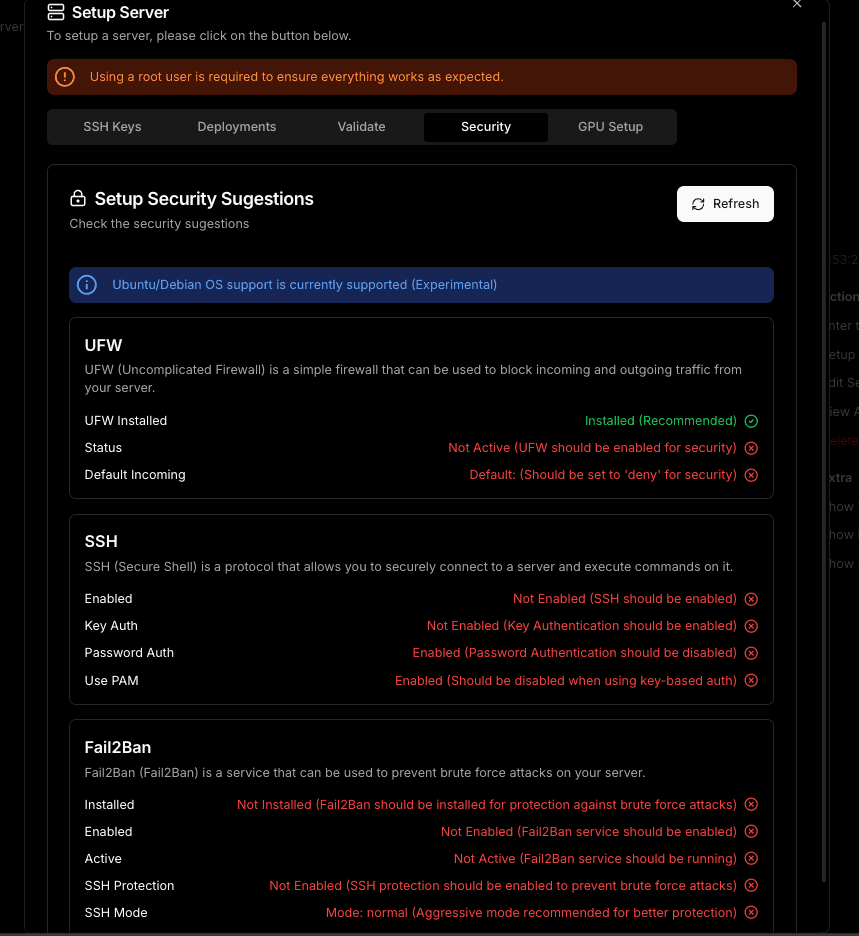
Security Status Check
Dokploy automatically validates these security configurations and provides recommendations:
Warning
These security measures are essential baseline recommendations. Depending on your specific use case, additional security measures might be necessary.