Audit Logs
Track all actions performed by members in your organization
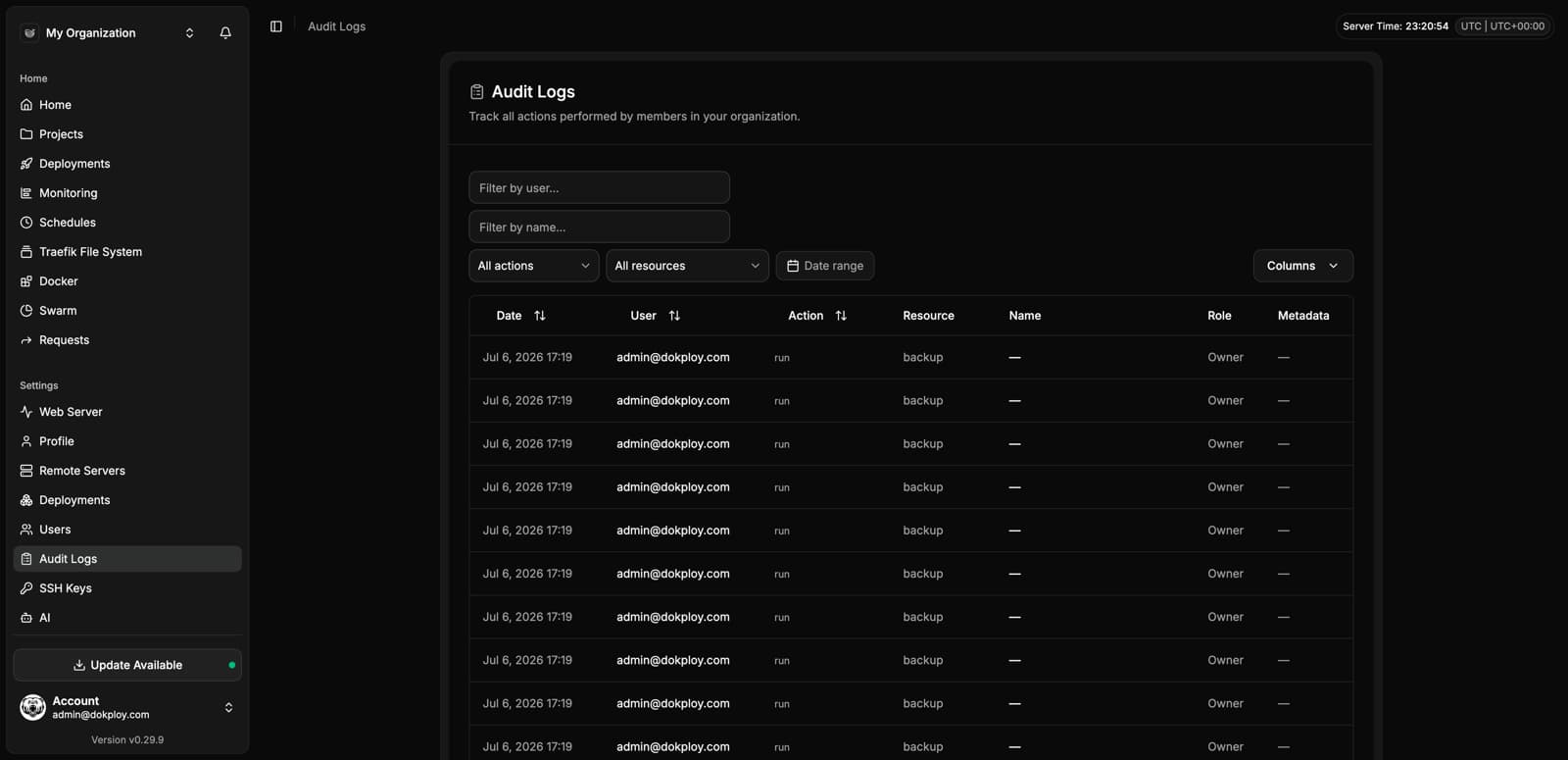
Audit Logs give Enterprise users complete visibility into every action performed within the organization. Every create, update, delete, login, logout, deployment, and configuration change is recorded — giving you a full trail for security, compliance, and debugging.
Overview
Audit Logs are available in Settings → Audit Logs. Each entry captures:
| Field | Description |
|---|---|
| Timestamp | When the action occurred. |
| User | The email of the user who performed the action. |
| Action | The type of action — Created, Updated, Deleted, Deployed, Login, Logout. |
| Resource | The type of resource affected (e.g. application, Custom Role, Settings, Session, Domain). |
| Name | The name or identifier of the resource. |
| Role | The role of the user at the time of the action (e.g. owner, developer, member). |
| Metadata | Additional context when available. |
What is Logged
Audit Logs track every meaningful action in your organization:
- Authentication — User logins, logouts, and session events.
- User Management — Creating, updating, or removing users and changing role assignments.
- Custom Roles — Creating, updating, or deleting custom roles.
- Projects & Services — Creating, updating, deploying, and deleting applications, databases, and compose stacks.
- Domains — Adding or removing custom domains.
- Environment Variables — Changes to service, project, and environment-level variables.
- Settings — Updates to organization settings, whitelabel configuration, and version updates.
- Infrastructure — Changes to servers, registries, certificates, SSH keys, and S3 destinations.
- Backups & Schedules — Creating, updating, or deleting backups, volume backups, and scheduled jobs.
- Notifications — Changes to notification providers.
- Secrets Providers — Creating, updating, or deleting connections to external secret managers (HashiCorp Vault / OpenBao, Infisical, AWS Secrets Manager, Doppler, Azure Key Vault, Scaleway Secret Manager). See Secrets Providers.
- DNS Providers — Creating, updating, or deleting DNS provider connections (Cloudflare, AWS Route53). See DNS Providers.
Filtering
You can filter audit log entries to quickly find what you're looking for:
- By user — Search for actions performed by a specific user.
- By name — Search for actions on a specific resource name.
- By action — Filter by action type (Created, Updated, Deleted, etc.).
- By resource — Filter by resource type (application, Settings, Custom Role, etc.).
Use Cases
- Security investigations — Identify who made a specific change and when.
- Compliance — Maintain evidence of access control and change management for SOC 2, GDPR, and internal policies.
- Debugging — Trace deployment failures or configuration issues back to the change that caused them.
- Team visibility — Understand what actions team members are performing across the organization.
For questions about audit log retention or integration with external logging systems, contact us.